Well, I have a small confession to make, since I renewed my website, every click you make after the first page is a soft navigation, and until a few months ago Chrome didn’t measure those by default, so as far as Core Web Vitals were concerned, my whole website was just one page, the one you landed on 😅
In this article I will tell you what soft navigations are, how you can finally measure them, and the bugs they caused on my website, with real numbers from it.
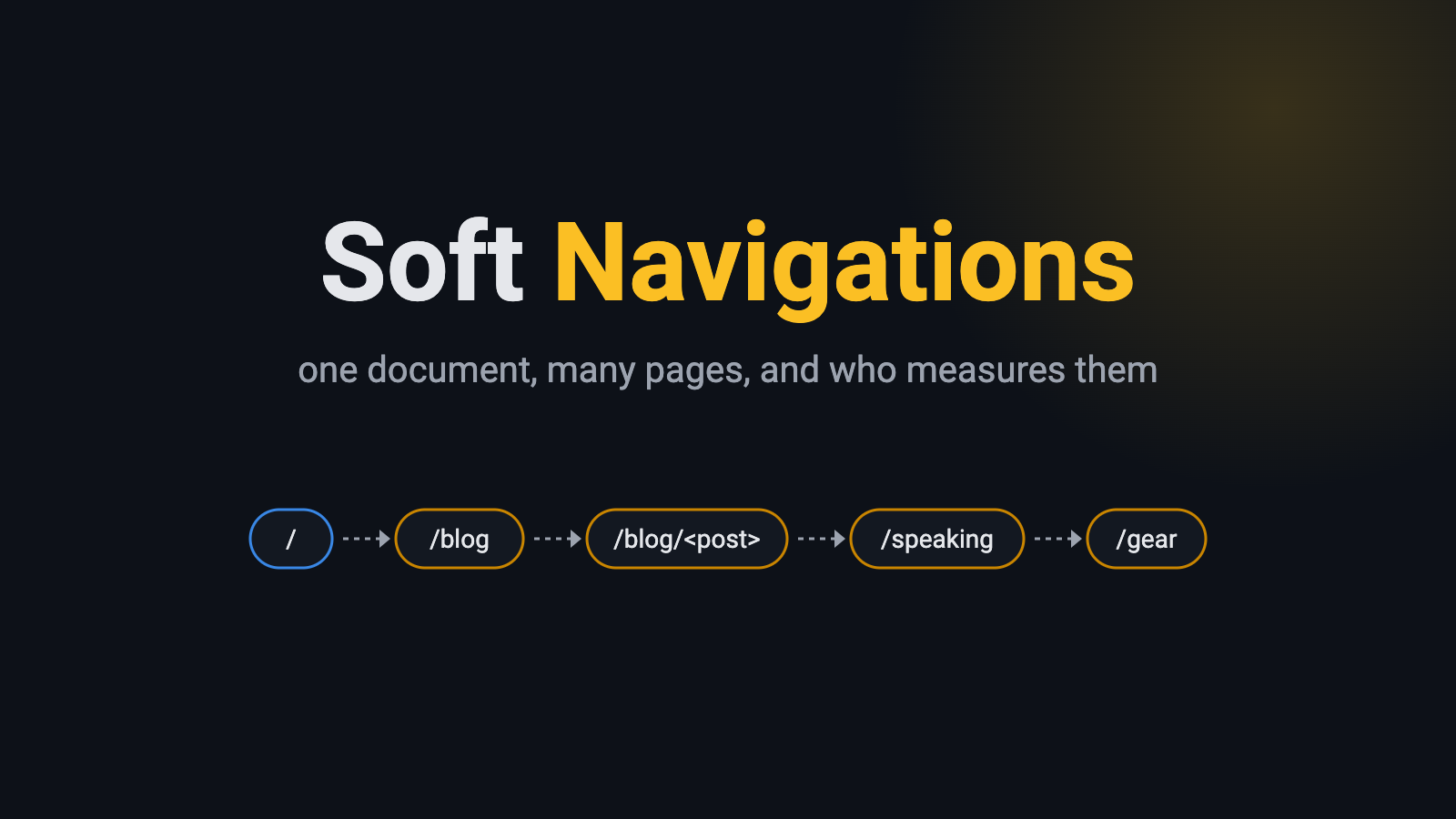
What is a soft navigation?
Let me explain it with a house 🏠, a hard navigation is like moving to a new house, you click a link, the browser throws away the current page, asks the server for a new HTML document and builds everything from scratch.
A soft navigation is more like rearranging the furniture in the same house, JavaScript fetches what it needs, swaps the content of the page and changes the URL with the History API (pushState) or the Navigation API, so for you it looks like a new page, but for the browser it is still the same document. So everything that was in the house is still there, keep that in mind, we will come back to it.
This is how single-page apps work (React, Vue, Angular and friends), and yes, it is also how my website works, it is built with Astro and uses its View Transitions, so only the first page you open is a hard navigation, and every click after that is a soft one.
And no, being a static website doesn’t change that, every page is still a prebuilt HTML file, Astro just fetches it and swaps it in instead of letting the browser load it.
Why measuring them was a problem
Here is the thing, Core Web Vitals were designed around documents, LCP is reported once per document, and CLS and INP keep adding up for the whole life of that document.
So on a website like mine, the LCP is measured only for the page you landed on, and the INP and CLS of every page you visit after it get blamed on that first URL.
I wanted to see it with my own eyes, so I measured the same session on my website in both ways:
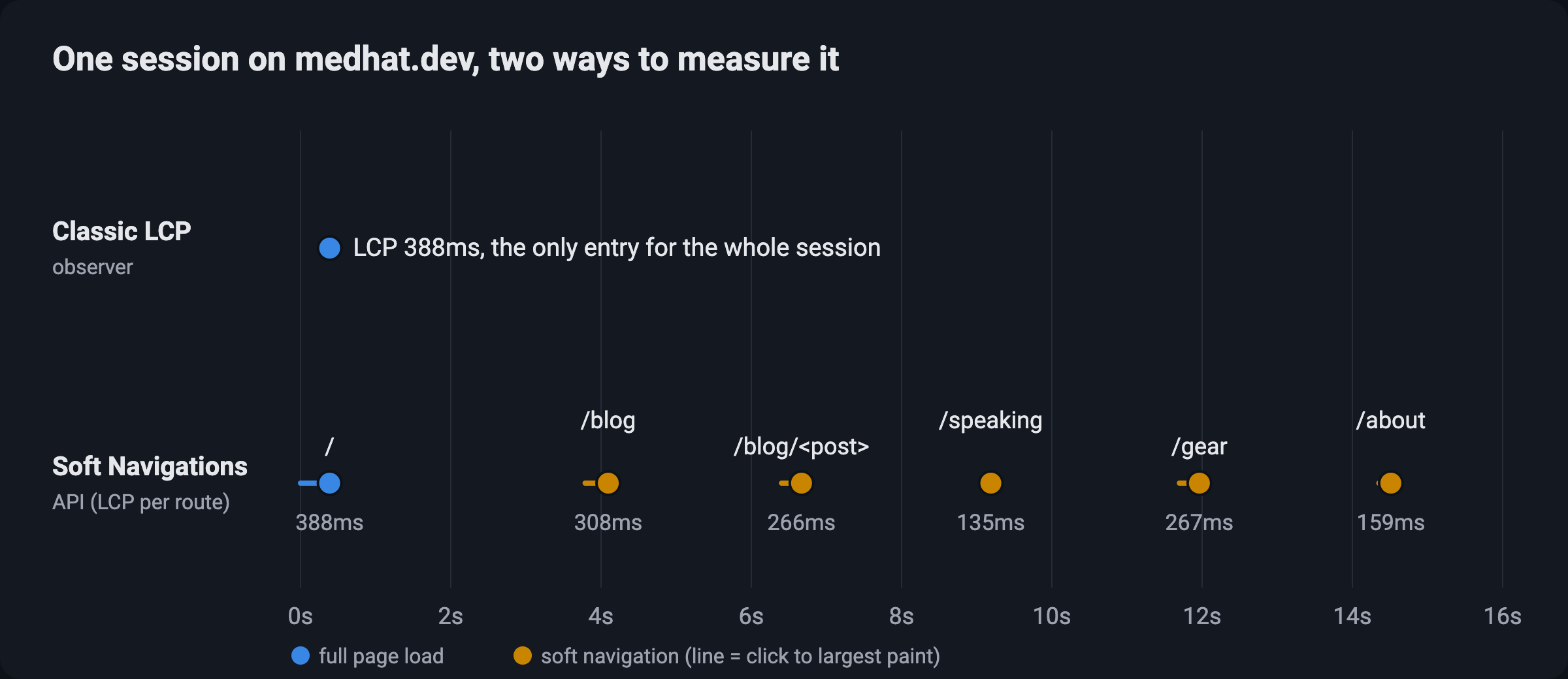
The classic LCP observer reported exactly one entry for the whole session, while I visited 6 pages 🤯
The Soft Navigations API
Luckily, the Chrome team has been working on this since 2023, with a couple of origin trials (the final one in Chrome 147 to 149), and it is finally enabled by default since Chrome 151, which was released on July 28, 2026, and Edge got it in 151 as well.
Chrome treats a navigation as a soft one when three things happen:
- You start it with an action, like a click or a tap.
- The URL changes.
- Something new gets painted on the screen.
And when that happens, you get two new performance entries:
soft-navigation: one entry for every soft navigation, with the new URL as itsname, anavigationType(push,replaceortraverse), and anavigationId.interaction-contentful-paint: the paints that happen after an interaction, with alargestContentfulPaintinside it, and this is how we get the LCP of a soft navigation.
On top of that, the entries you already know (LCP, layout shifts and event timings) got a navigationId too, so you can finally tell which page each of them belongs to.
Here is the small snippet I used to measure my own website, it collects the soft navigations, and later reads the largest paint of each one:
const softNavigations = [];

new PerformanceObserver((list) => softNavigations.push(...list.getEntries()))
  .observe({ type: 'soft-navigation', buffered: true });

// later, for example before the next navigation or when the page gets hidden
for (const navigation of softNavigations) {
  const icp = navigation.getLargestInteractionContentfulPaint();
  if (!icp) continue;
  const lcp = icp.largestContentfulPaint.startTime - navigation.startTime;
  console.log(navigation.name, `${Math.round(lcp)}ms`);
}
Notice that I subtract navigation.startTime, because all the timings are relative to the first hard navigation, not to the click, more on that in the gotchas below.
What I found on my own website
I went through my website the way you would read it, the home page, then the blog, then a post, then the speaking, gear and about pages, and I did that 5 times:
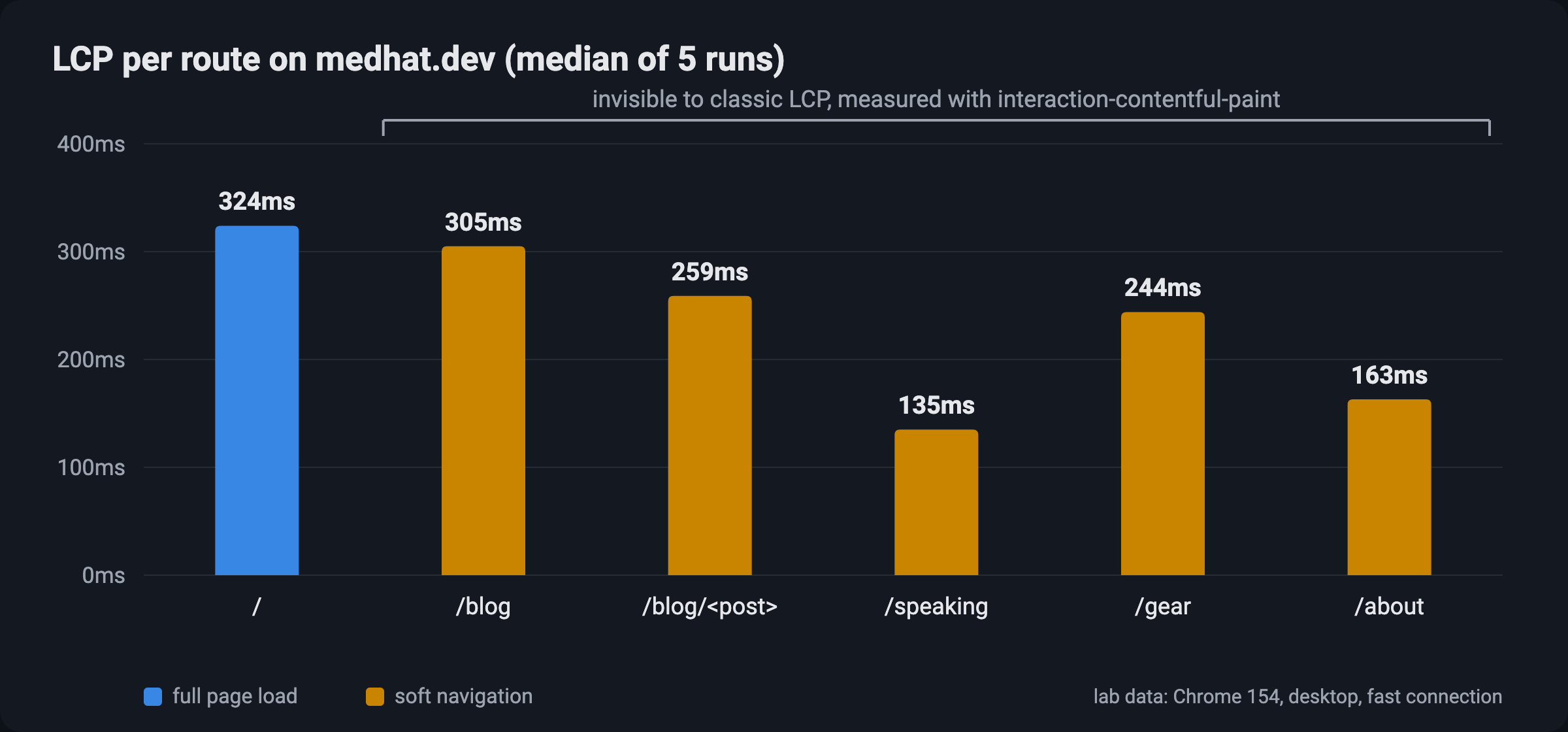
| Page | Navigation | LCP | LCP element |
|---|---|---|---|
/ | hard | 324ms | the biggest photo in my speaking gallery |
/blog | soft | 305ms | the cover image of my latest post |
/blog/appreciate-button | soft | 259ms | the first screenshot in the post |
/speaking | soft | 135ms | text |
/gear | soft | 244ms | the AI generated image of my chair 😄 |
/about | soft | 163ms | my profile photo |
Lab data, Chrome 154 on desktop with a fast connection, so it is not what my real visitors get, but it shows the idea.
All the pages are fast, but the more interesting part is that before Chrome 151, Chrome didn’t report 5 of these 6 numbers at all, and while I was at it, I noticed a few more things:
- The back button counts too: going back from a page showed up as a soft navigation as well.
- The click belongs to the previous page: the click on “Speaking” was counted for the blog post I was reading, not for the speaking page, so the INP of a page includes the click that leaves it.
- My sidebar can never be the LCP of a soft navigation: only the elements that repaint after the click count, and my sidebar stays as is, while on the first load it could.
- Google Analytics was already fine: it sent a
page_viewfor the route changes I clicked, since it listens to the history changes.
Gotchas worth knowing
Before you go and measure your own website, here are a few things to keep in mind, most of them come from the official docs, and some of them I learned the hard way:
- Timings are relative to the hard navigation: subtract the
startTimeof the soft navigation, as in the snippet above. - TTFB is 0: there is no new document, so there is no time to first byte to report.
- Match paints by the interaction: an
interaction-contentful-paintentry can carry thenavigationIdof the previous page, so usegetLargestInteractionContentfulPaint()or match byinteractionId. - Use
PerformanceObserver:performance.getEntriesByType()only keeps the first 50 entries. - Layout shifts right after the click may be excluded: shifts within 500ms of the interaction are expected, the same as with any user input.
- Send the navigation type to your RUM: so you can compare hard and soft navigations instead of mixing them.
Don’t write it yourself, use web-vitals
Honestly, you probably don’t want to deal with all of the above by hand, and you don’t have to, the web-vitals library supports soft navigations since version 6, and all you need is one option:
import { onLCP, onINP, onCLS } from 'web-vitals';

const options = { reportSoftNavs: true };

onLCP(sendToAnalytics, options);
onINP(sendToAnalytics, options);
onCLS(sendToAnalytics, options);
Every metric then tells you which page it belongs to (navigationURL, navigationId and navigationType), and if you prefer to see it, Chrome DevTools shows the soft navigations in the Performance panel too, in the trace, in the live metrics and in the insights.
Good news: since October 2026, CrUX publishes experimental versions of LCP, INP and CLS that include soft navigations, you can find them in the CrUX BigQuery dataset, the CrUX API and the CrUX History API. But as the name says they are experimental, so the stable Core Web Vitals scores didn’t change, and Search Console will only switch to them once they graduate, which is planned for May 2027.
Living with soft navigations: the bugs I had right after the renewal
Remember the house? with soft navigations you never move to a new one, so the browser stops cleaning up after you, and everything you left behind is still there, here are the bugs that this caused on my website in the first week after the renewal.
1. The appreciate count that moved
On a post page, the count of the appreciate button sits above the icon, so I wrote this:
function initSocialElement() {
  const appreciateButton = document.querySelector('appreciate-button');
  // ...set data-count="top" on desktop
}

document.addEventListener('DOMContentLoaded', initSocialElement);
document.addEventListener('astro:page-load', initSocialElement);
document.addEventListener('astro:after-swap', initSocialElement);
Looks fine, right? but hear me out, the document never changes, so these listeners stay alive after you leave the post, and when you go back to the blog page they run again, document.querySelector finds the button of the first card, and its count jumps to the top until you refresh the page.
The fix was simply to look only inside the post:
const appreciateButton = document.querySelector('#shareSocial appreciate-button');2. Comments that never loaded
This one was worse, the comments script was an inline script, and Astro runs inline scripts again on every navigation, so every post you visited added 3 more listeners to the document.
Then on the blog page, which has no comments at all, these listeners tried to create the comments widget, it crashed with Remark42: Can't find root node., and that crash broke the widget for every post after it, so the next posts were stuck on “Comments loading…” forever, and guess what? it also created the widget twice on every direct visit 🤦♂️
The fix was to move it to a bundled script that runs only once, listen to astro:page-load only, and skip the pages without comments, and after that the comments showed up in 0.4 to 0.7 seconds on every post, instead of never.
3. Register global listeners once
So when I added a small confetti burst for when you fill the appreciate button of a post, I had learned my lesson and did it the right way from the start:
// Registered once per page load: a document listener survives View Transitions
// navigation, so adding it in initSocialElement would stack one per post visited.
document.addEventListener('appreciate:maxed', (event) => {
  // ...only react to the button of the current post
});
And here is a quick summary of what changes when you move to soft navigations:
| Hard navigation | Soft navigation | |
|---|---|---|
| JavaScript state | starts fresh | everything stays, including old listeners |
| Your scripts | run again | depends on the framework, in Astro inline scripts run again and bundled ones don’t |
| Third-party widgets | load again | you may have to destroy and create them yourself |
| Analytics page views | automatic | only if it listens to history changes |
| Core Web Vitals | measured | measured with the Soft Navigations API in Chrome 151+ |
| CrUX field data | yes | experimental, since October 2026 |
Browser support
The important thing to understand here is that soft navigations themselves work in every browser, since they are built on the History API, what differs is the support for measuring them and for the APIs around them:
| Feature | Baseline | Chrome / Edge | Firefox | Safari |
|---|---|---|---|---|
History API (pushState) | Widely available | 5 / 12 | 4 | 5 |
| Navigation API | Newly available (2026) | 102 | 147 | 26.2 |
| Same-document View Transitions | Newly available (2025) | 111 | 144 | 18 |
| Cross-document View Transitions | Limited | 126 | ❌ | 18.2 |
| Speculation Rules | Limited | 109 | ❌ | ❌ |
| Soft Navigations API | Limited | 151 | ❌ | ❌ |
So for now, measuring soft navigations is a Chrome and Edge thing, Mozilla and WebKit didn’t take a position on it yet, and their standards positions issues are still open (Mozilla, WebKit).
And to be fair, if your website is a multi-page website, cross-document View Transitions with Speculation Rules can give you the same smooth feeling with real hard navigations, so none of the bugs above, but as you can see in the table, they are not supported everywhere yet.
Thanks Barry
A special thanks to Barry Pollard, my perf lead at the Chrome team, who wrote the official docs about soft navigations together with Michal Mocny, and has been pushing this API for years, so we can finally measure websites the way users really experience them 🙏
Conclusion
Soft navigations are not new, but measuring them is, so if your website is a single-page app, or uses something like Astro’s View Transitions, Chrome now sees all the pages after the first one, and you should too, use web-vitals with reportSoftNavs, send the navigation type with your metrics, and remember the house, with soft navigations the browser doesn’t clean up after you 😉
If you have any questions, or you measured your own website and found something interesting, let’s discuss it in the comments below, they load now, I promise 😄, and don’t forget to press the appreciate button if you liked this post.
Resources
- https://developer.chrome.com/docs/web-platform/soft-navigations
- https://developer.chrome.com/blog/final-soft-navigations-origin-trial
- https://developer.chrome.com/blog/new-in-chrome-151
- https://wicg.github.io/soft-navigations/
- https://github.com/GoogleChrome/web-vitals
- https://web.dev/articles/vitals-spa-faq
- https://web.dev/blog/crux-experimental-soft-navs/
- https://web.dev/articles/vitals
- https://developer.mozilla.org/en-US/docs/Web/API/PerformanceSoftNavigation
- https://developer.mozilla.org/en-US/docs/Web/API/InteractionContentfulPaint
- https://developer.mozilla.org/en-US/docs/Web/API/Navigation_API
- https://developer.mozilla.org/en-US/docs/Web/API/View_Transition_API
- https://developer.mozilla.org/en-US/docs/Web/API/Speculation_Rules_API
Tot ziens 👋