In this article I’m sharing my own experience studying for and passing the FE system design interview at several high-standard tech companies. I believe you are familiar with most of what is written here, but the most important addition is that you will learn how to arrange your thoughts and manage your expectations for this interview, simply a mental model for this relatively new type of FE interview.

Hey, if you are reading this article with an FE system design interview already scheduled: first of all, “good luck”; second, you may skip the intro if you don’t have much time; third, once you finish reading, practice as much as you can.
Intro
Twelve years ago, the split between Frontend and Backend work was about ~10% to ~90%, and it was clear that most of the work and logic happened on the BE side, while the FE was merely there to validate a form and send the user interaction to the BE using vanilla JS, or, if you wanted slightly cleaner code, jQuery or one of the libs built on top of it.
I know that for people new to the web world it might be a bit shocking that back in the day there was no client state management, not much care for caching, no direct way to build a single page app, which means no routers, no standard module system (CommonJS, AMD, and most code ran in IIFEs), and the overall JavaScript ecosystem was much weaker than it is nowadays.
Now, the share of FE work has become much higher, at least ~60% of the work (on average) could be on the FE side (putting the DevOps part aside). New challenges come up year after year, and the ecosystem has improved a lot to enhance the Frontend developer experience, like adding a standard module system, several ways to build a single page app, routing, state management, performance tuning, a huge number of FE frameworks that confuse young developers, and much more.
In the last few years, it has become very important for product companies that want to hire great senior FE engineers to gauge their ability to design a system at all FE levels, given all the available technologies out there and the share of the codebase that has moved to the FE side.
In this article, I will walk you through some pillars that are very important in order to Crack the Frontend System Design Interview.
What to expect in that interview?
Usually, companies pick a small problem that can be tackled in 40min max, as the interview usually starts with about 10min of introductions, first from the interviewer’s side, then from the interviewee’s side (you), and they always keep about 10min at the end for your questions or a follow-up question, so it is very important to understand the challenge very well before even starting on the solution.
Companies usually tend to ask you to design some part of a product they already have, or of a well-known public site, so I advise you to check the product of the company you are interviewing with, challenge yourself to design something similar (by design I don’t mean styling with CSS), and try to anticipate the challenging parts that could be valuable for them and think about them. How to set your mental model is explained a bit later in this article.
FE system design interview questions (examples):
Design a chat app for customer service …
Design a search bar in the home page …
Design a collaboration board …
Design Twitter feeds …
Design Google Calendar …
As you noticed, the problem is very concise, without any details. That’s intentional, because it is part of the interview to test your ability to extract the details yourself, especially if you are interviewing for a senior level and above. Asking the right questions and analyzing data are crucial traits for experienced Frontend Engineers.
Steps to tackle the problem
Now that you know the question, it is time to decide how you are going to split the time and use your knowledge in your best interest. Below is a list of the steps for handling a challenge and the different parts that FE system design interviews usually focus on. I’ve followed them several times as explained below, and I passed every time 🎉 (some changes might happen based on the interview or the company’s product).
Steps
- Extracting Information
- Setting the scope (MVP)
- Data entities & API endpoints
- Component Architecture
- Data Model (State Management)
- Network Communication
- Performance Optimization
- Accessibility (A11y)
- Other areas
1. Extracting Information
Asking the right questions and using the answers in your design is a rule of thumb. You first need to take your time to understand what you need to achieve, and it is okay to tell your interviewers that you need a silent moment first to think about what is needed. It might even be a good sign 🍀 that you don’t just say whatever comes to your mind.
After you think, start by asking some good questions, but keep in mind that the questions should be relevant to the problem you are designing a solution for. Also, only ask questions that your design decisions might be based on, asking questions that you don’t take into consideration later is a red flag 🚩.
Examples of good questions to extract information 👇:
- Where is this application going to be used? This has 2 parts. The first is whether it will be used on Desktop, Mobile, or Tablet, which is very important to know, at least whether the app will be heavily used on Desktop, for example, which makes you decide to build for Desktop for the MVP, and that might affect other decisions as well. The second is browsers, whether you are going to support old browsers or not (I doubt that people are going to support IE11 anymore, but you never know).
- Who is going to use it? Their age, the number of users for the MVP, and the probability of scaling in the future, so you get an idea of whether to expect follow-up questions about scale and can scope the MVP for a small number of users, and the type and age of users would be useful later for other areas like A11y.
- Where geographically? This question extracts info about supporting i18n or using a CDN to host the assets for the MVP.
- and more questions of this kind, but it is very important to ask questions that get you good info that can be used later in your design.
2. Setting the scope (MVP)
After getting all the important information, it is time to set a scope for your MVP (Minimum Viable Product). This step is very important, as the interview time is very limited, around 40~45min, and you have already spent about 5~10min asking questions that give you enough understanding, so you only have around 30min to design the system.
Split the requirements into 2 types ✌️:
1. Functional
These are the ones that the interviewer asks you to build and the user will see and interact with, so for example, if you are asked to build a Twitter feed page, you need to list what will be functional as follows 👇:
- user can write a tweet
- user can see the tweets feed in desc order
- user can like and retweet tweets
- and so on …
2. Technical (Non-functional)
These are the ones that you extracted from the interviewer’s answers in the first step, plus other assumptions you might make and verify with the interviewer, some of them as follows 👇:
- the app will be real time
- the app will work offline
- the app should be responsive
- and so on …
After writing them all down, focus on the main parts that the interviewer gives you a signal they are going to focus on and include them in the scope of the MVP. The rest can be listed under “Beyond MVP” to be discussed if you have time at the end.
I literally create two lists on the board used for the interview, one titled MVP and the other titled Beyond MVP, fill them in, and get approval from the interviewer at the end.
It is very important to make sure that the scope you defined for your MVP is approved by the interviewers before starting on anything.
3. Data entities & API endpoints
Now that you have the scope and a better understanding of what is needed, it is time to really design the application, starting from the data structure: what does the data look like, and what do you expect the API endpoints to look like?
Someone might ask why should I decide that, since BE engineers will do it for me? and this is a good and (slightly) valid question to be honest, so I’ll try to tell you why you should do it, and in some cases why you must.
As a Senior FE Engineer, you might be asked to build a new feature before the endpoint has been created, and based on your UI, you are in the best position to decide what you expect from the endpoint in order to show the correct and complete data in the UI.
This knowledge is crucial when you are building the type system using TypeScript, for example. The types of the properties and the structure are now not dictated only by the BE as in the past, so designing the data entities in the interview could be done through types like the ones in TypeScript, which are very familiar to any FE developer.
Here is an example of an answer 👇:
// example of a data structure for a tweet
type Tweet = {
  tweet_id: string;
  author_id: string;
  tweet_body: string;
  likes_count: number;
  retweet_count: number;
  ...
}

// example of an endpoint
const getTweetUrl = '/api/v1/tweets/:tweet_id';
The goal of this part is to show your knowledge of the code behind, and that you can easily work with BE Engineers, produce a complete product, and set the data contract. This step is really important to understand the system and to show your understanding of it.
4. Component Architecture
Now it is time to show your imagination of the UI. In some cases the interviewer might give you a screenshot or ask you to design something very famous or part of their product (it is very useful to have a look at their product before the interview).
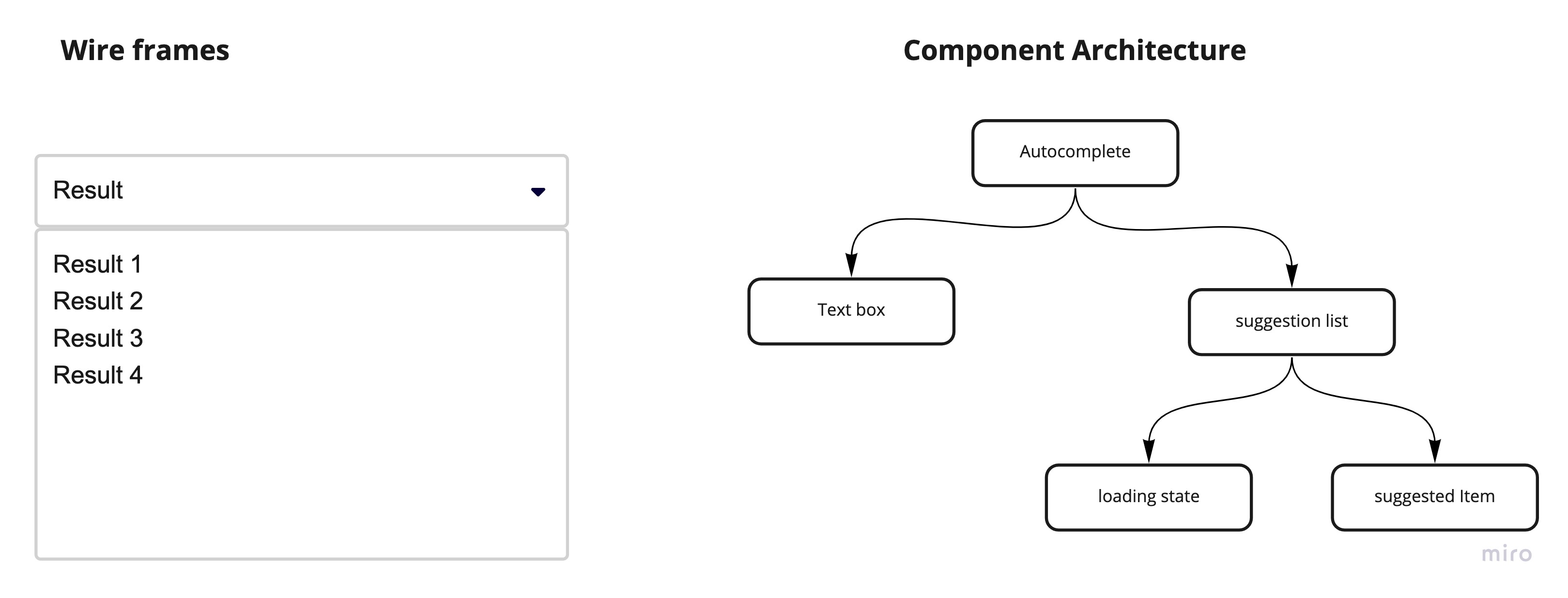
What is needed here is not code, it is about drawing a wireframe first, if there is no screenshot, to show your ability to turn the text into something visual, then drawing a chart of the components you might build to implement this design, starting from the main parent component and breaking it down to the smallest ones you can think of.
It’s important to speak as you draw the charts and show why you would build your solution like that. Keep it light as well, as it is not really the implementation, you are showing the people who are going to implement the system why you made it like that in the first place.
Yes, you may think about the system design interview as documentation for a solution that other people will implement, so try to stay high-level without any implementation details, but write down your rationale.
Here are the wireframes and component architecture for a type-ahead widget 👇:
5. Data Model (State Management)
After you build the component architecture, you need to explain how these components are going to talk to each other, simply put, as stated above: how will you design your state?
Using the same component chart you drew in the previous step, you can add some annotations on the arrows about where will you fetch data? and in which component? Also, which component is using which piece of the state?
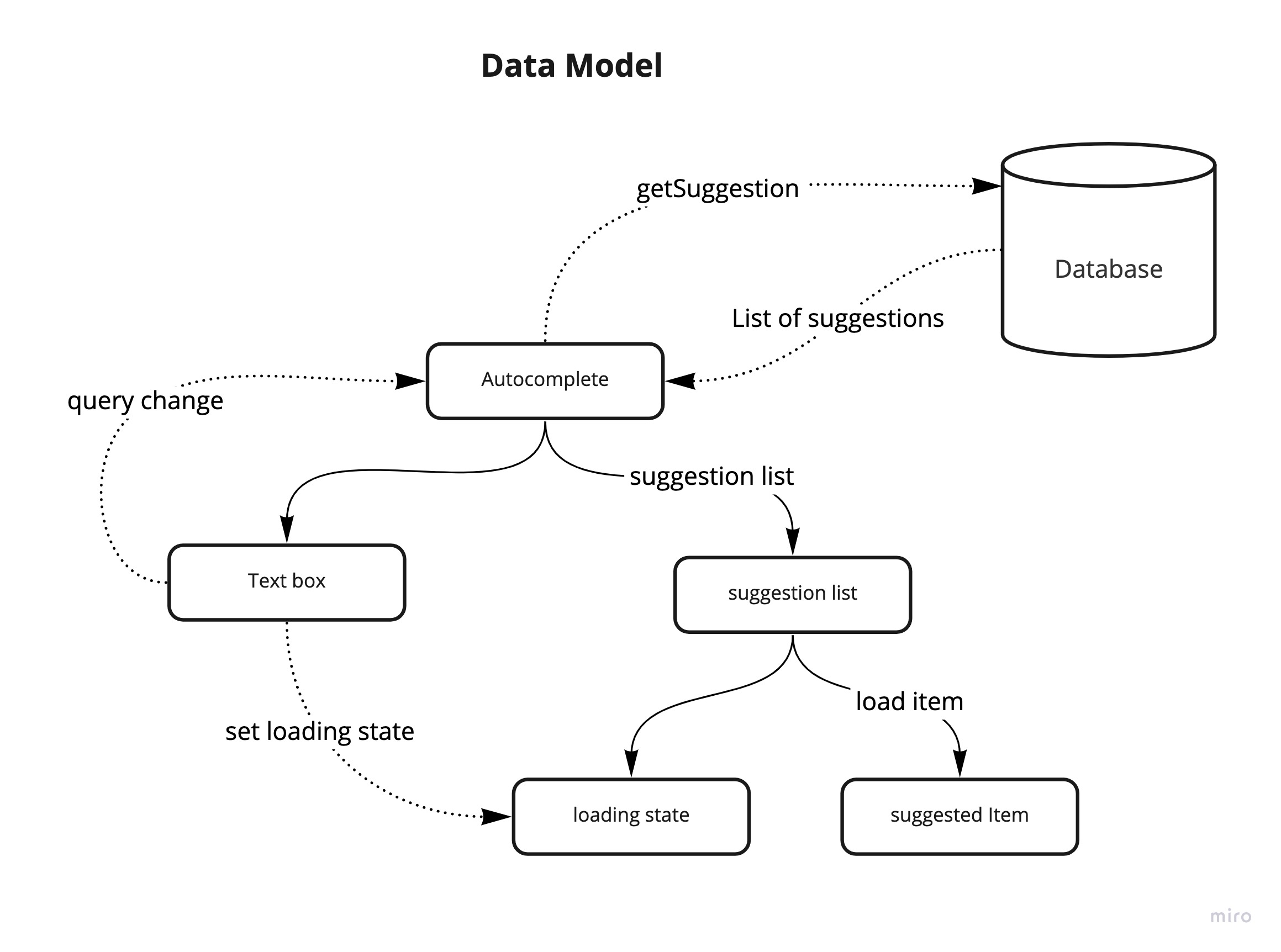
Show how you decided to share info between components: is it props drilling or a centralized store like Redux, MobX, or maybe a state machine like XState? It’s important to explain all the options that might fit here, talk about the drawbacks of each, and why you chose the one you did.
It might also be very useful to design the state structure, showing what will be there and the data flow, or Data Model. This shows your understanding of how to manage state in the frontend and how you split it based on application usage, which is a very important pillar of FE skills.
You can also write some component APIs, like the props, and what the main components expose for other components to use, for example:
onChange: (query: string) => void;
onBlur: () => void;
That gives an idea about each component and what it exposes in case you wrap it into a public npm package, for example.
6. Network Communication
After everything you have explained so far, you need to start talking about your communication with the server. It is very important to know the different ways to communicate with the server, how you can fetch the data, and why one of them might fit the solution best, and NEVER say it’s because this is the one I like, the one I know, or I feel that this could work 🚩, you can’t make architecture decisions based on your gut feelings.
For example, if you are asked to build a chat widget, you definitely need real-time communication, and you have multiple options here, including Long Polling, Server-Sent Events, or WebSockets. You should not just say, for example, I’m going to use WebSockets, and proceed, you also need to say why not Long Polling, why not Server-Sent Events, and even why not normal HTTP requests? These are valid questions that need answers, and interviewers expect you to explain them.
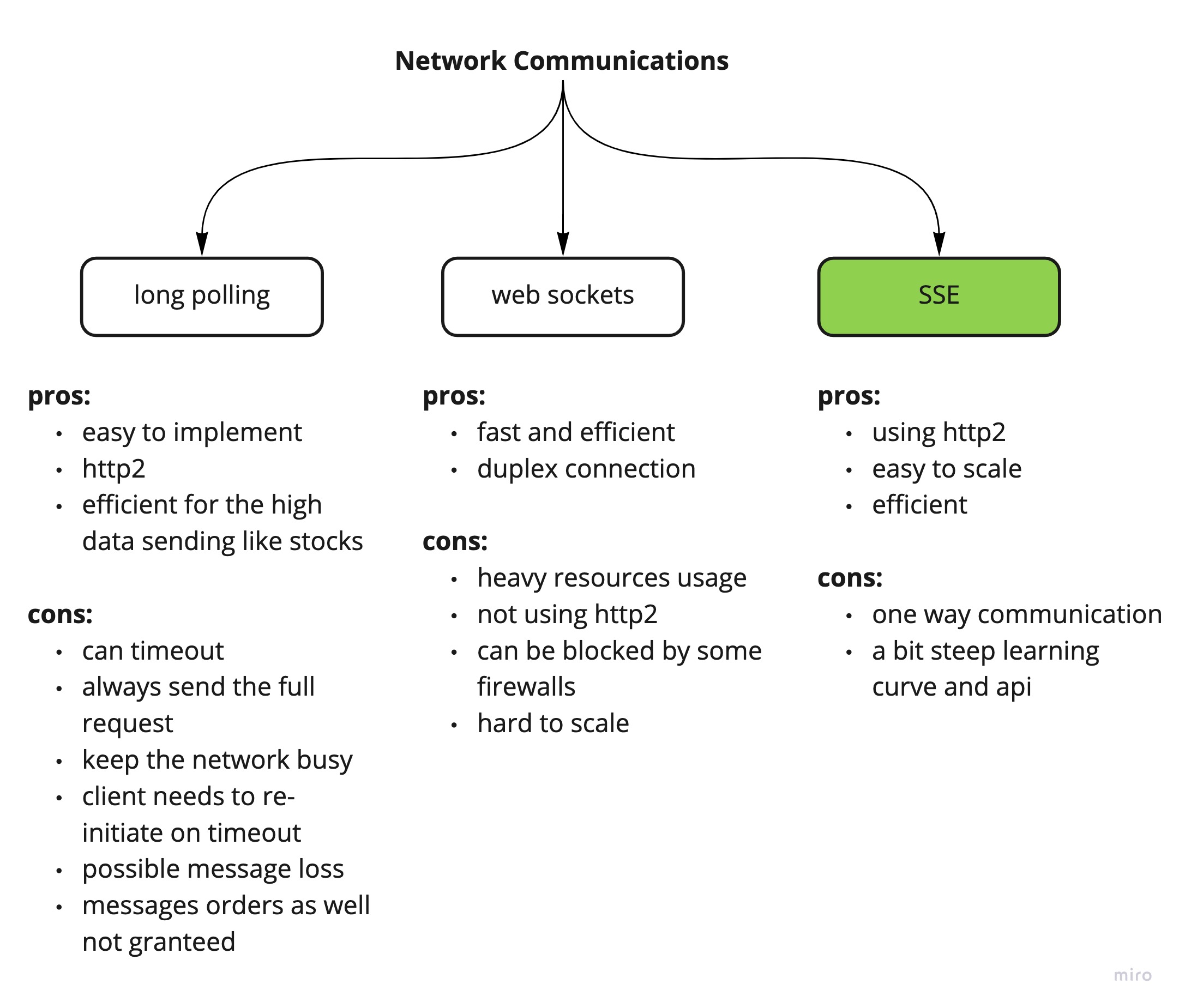
As you can see in the example above for a chat app, there is a comparison of the pros and cons of each, and in the end you might change the color of the chosen one and explain why you chose it over the others.
7. Performance Optimization
Here comes the tricky part (and the most interesting one for me): after you have designed the data entities, built the component structure, designed the data flow, and talked about your choice of network communication, it is time to talk about the optimizations you see in all of these steps.
Performance is a huge topic, and you need to be concise given the time you have. It will differ based on the application you are designing, for example, if you have a huge list you might need to mention list virtualization, but that doesn’t fit all solutions, if you have only 100 records, virtualizing them would not make a big difference.
Here is a list of some common parts that you might need to talk about 👇:
- Core Web Vitals (LCP, INP, CLS)
- images (size and CDN)
- compression (Gzip or Brotli)
- code splitting and lazy loading
- Server Side Rendering
- Service workers (make the app work offline)
- loaders and skeleton design
- and more…
Basically, you need to learn more about the specific performance issues that might happen in the application you are designing and write them all down with a suggestion for each. It doesn’t have to be a full list, but talking about image optimization in a chat app, for example, is important, talking about Core Web Vitals in an e-commerce app is very important, and so on.
I recommend checking the performance series of articles on my blog to strengthen your knowledge of performance in general.
8. Accessibility (A11y)
I would say this part is usually a bonus one, if time permits, talk about it. However, A11y is very important and might give you extra points if you are familiar with it and can mention it in relation to your design.
Here are some examples of things that you can mention 👇:
- all images to have an alt attribute
- use semantic HTML
- use ARIA attributes only where semantic HTML isn’t enough
- make sure to have high contrast colors
- make everything usable with the keyboard
- and so on …
9. Other areas
After all the things mentioned here, you have an almost complete solution for most of the problems that might be given to you in an interview. However, in some cases you need to focus on other things as well to get some extra credit, as follows:
Some other areas that you might need to mention based on the question 👇:
- Unit + e2e testing
- Security (CORS, XSS, HTTPS, etc.)
- SEO and OG tags for public content
- i18n and l10n
- monitoring and observability
- A/B testing
Each of them might need a post of its own, but I will leave it to you to read about each and prepare ahead. Again, checking the company’s product will give you a big picture of what to expect and what they might be focusing on.
Also, searching Glassdoor and LeetCode for the company you are interviewing with might be very helpful to understand the type of FE system design questions they ask, which is a relatively new type of interview in the frontend world.
Conclusion
In this article, we went through a list of topics that, as I mentioned earlier, might mostly be familiar to you, but the most important part is that we now have a kind of framework (mental model) to answer frontend system design interview questions with. And the most important thing after all is practicing this framework a lot to get used to it and be ready for your interview, the more practice the better.
To summarize the steps, each in one word: for any frontend system design interview, set your mental model to: Information, MVP, Entities, Components, State, Network, Performance, A11y, and Others.
Good luck, and if you would like to discuss this post, have a comment or an edit, or are interested in seeing a real case in an article or a video, don’t hesitate to contact me on Twitter.
Tot ziens 👋